





scan books app

    Scan your whole book collection, one shelf photo at a time

    This page is about getting an entire home library into the app by photographing it, not about adding one new book. It covers how to plan the shelves, take photos the AI can read, and deal with the books it misses.

    bookshelf scannerpeople with several full shelves to catalog at onceEvery shelf photographed, every match reviewed, and the leftovers added by barcode or search.

    How Librisync helps

    Scanning one book is easy. Scanning a whole house of books is a small project, and it goes wrong in predictable places: a shelf shot in bad light, a back row nobody remembered, a stack of paperbacks lying flat that the camera never sees. This guide treats it as a project, with an order of work and a plan for the books that don't come through.

    bookshelf scanner

    Typing or barcode-scanning hundreds of books one at a time usually stalls after the first evening.

    Every shelf photographed, every match reviewed, and the leftovers added by barcode or search.

    Plan the order before the first photo

    Pick one bookcase and work top to bottom, left to right, so you always know where you stopped. Decide on a name for each physical spot before you start ("Living room, left case" or "Nightstand pile"). Once a photo's books are imported, put them on a custom shelf with that name in your library. Later the catalog tells you where a book stands, not only that you own it. With a big collection, don't plan to finish in one evening. One bookcase per session is plenty, and a sticky note on the last board you photographed saves you from guessing next time. Start with the shelf you know best, where wrong matches jump out at you.

    Light, angle and spines the camera can read

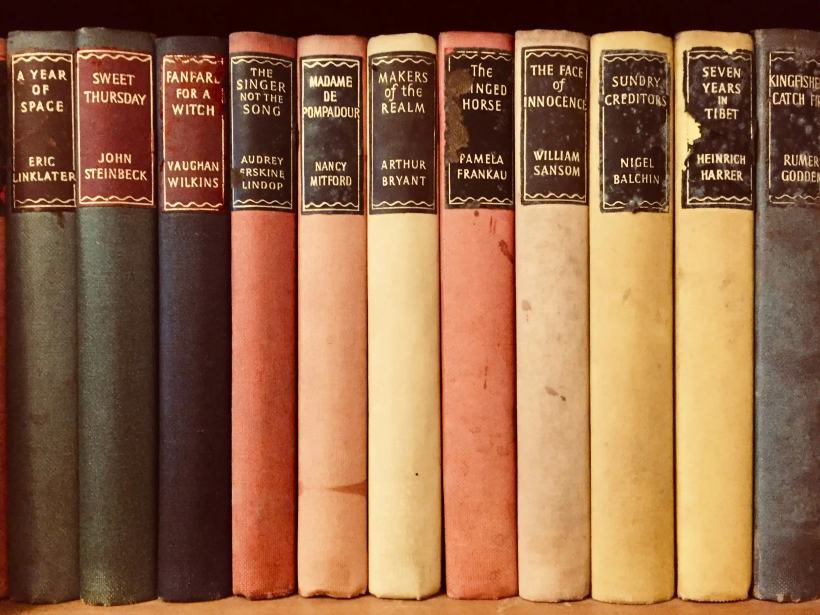
    The AI can only identify books whose spines or covers are visible in the photo. Stand square to the shelf, hold the phone level, and fit one shelf board per photo instead of the whole bookcase. Daylight from the side beats a ceiling lamp, which throws glare across glossy spines. Shiny dust jackets and gold lettering on dark cloth cause the most trouble, so tilt the phone a little until the reflection slides off. A row of skinny mass-market paperbacks needs you to step closer than feels natural. Comics and manga work too, as long as the text on the spine is legible in the picture.

    The books the photo doesn't see

    Picture a hallway shelf where mass-market paperbacks stand two rows deep: Stephen King in front, a row of yellowed Agatha Christie paperbacks hidden behind. The photo captures the front row and nothing else. Shoot the front, lift that row out, then shoot the back. Books lying flat on top of the others are the second blind spot. Stand them up for the photo, or photograph the stack from the side with the spines facing the camera. Anything packed in a moving box, behind a glass door that reflects the room, or currently at a friend's place needs its own step. For the lent ones, note in Librisync who has them.

    Reviewing matches before they reach your library

    Each photo turns into a list of suggested matches with title, author, cover and ISBN. Nothing lands in your library until you've looked at it. Watch for the usual slips: a translation matched to the original title, a boxed set read as a single volume, the wrong edition of a cookbook. You can correct the title and author, pick an alternate cover, or remove mismatches right inside the review. This is also where duplicates surface. If the book is already in your catalog, from an earlier photo or because a second copy sits in the study upstairs, the review flags it and you decide whether you really own two. A careful review now saves a cleanup later.

    Librisync

    Build the book system around your real shelves

    Start with a few books or scan a whole shelf. Librisync keeps the structure useful after the first import.

    Free up to 100 books · No credit card

    What to look for

    Many books per photo

    A scan books app should read a whole shelf board from one photo instead of asking you to scan every book separately. Check that it handles comics and manga too, since their spines look nothing like a novel's.

    Review before import

    You need to see every match before it is saved. If an app imports whatever it guessed, wrong editions end up in your catalog and you won't notice until months later, when you search for one.

    A fallback for misses

    Some books will never come through a photo. For those, you can easily add the leftovers by barcode scan or manual search, so they don't turn into a separate project on another weekend.

    Shelves and tags afterwards

    Scanning a whole collection only pays off if you can later find where each book stands. Look for custom shelves and tags you can apply in the library once the books are in, and filters that use them.

    Your first evening: one bookcase, top to bottom

    Create a free account, which takes about 30 seconds, and stand in front of one bookcase. Photograph the top board, review the matches, fix anything that's off, and import. Move down one board. When the case is done, pull every book that no photo recognized into a pile on the floor and add those by barcode or search. Then, in your library, put the new books on a custom shelf named after that bookcase. You end the evening with one bookcase fully in the catalog and a clear sense of how long the rest will take.

    1. 1

      Photograph one board at a time

    2. 2

      Review matches, then add leftovers

    3. 3

      Sort the books onto shelves

    Related guides

    Features · Bookshelf Scanner

    Features

    Questions people ask

    Does this app scan the pages of my books?
    No. Librisync scans spines and covers to identify which books you own. It stores information about each book, like title, author, cover and ISBN, never its pages or text. If you want to digitize what's inside a book, you need a page scanner, which is a different tool for a different job.
    Why are some books missing after I photograph a shelf?
    The AI only identifies what it can see. Gaps usually come from a second row, books lying flat, worn or blank spines, or glare. Rearrange those spots and take the photo again, or add the remaining books by barcode scan or manual search.
    How many books can I scan in one photo?
    As many as are visible in the frame. One shelf board per photo usually works better than the whole bookcase, because the spine text stays large enough to read. That way you can capture hundreds of books in minutes. Spend the time you save on the review.
    Can I scan my whole library for free?
    Librisync is free forever for up to 100 books, with no credit card. That covers your first shelves, enough to see how the photo scan and the review handle your own editions before you decide what to do about the rest of the collection.

    Build the book system around your real shelves

    Start with a few books or scan a whole shelf. Librisync keeps the structure useful after the first import.