Add a book by searching its title, author or ISBN
Share a book wishlist with the people who buy you books
Here is how the wishlist works in Librisync: how a book gets onto it, how you turn a selection into a shared list, and what people can do once they open the link.
Bought the same novel twice already? Read our guide on how to avoid buying duplicate books before your next bookstore trip.
Inside Librisync
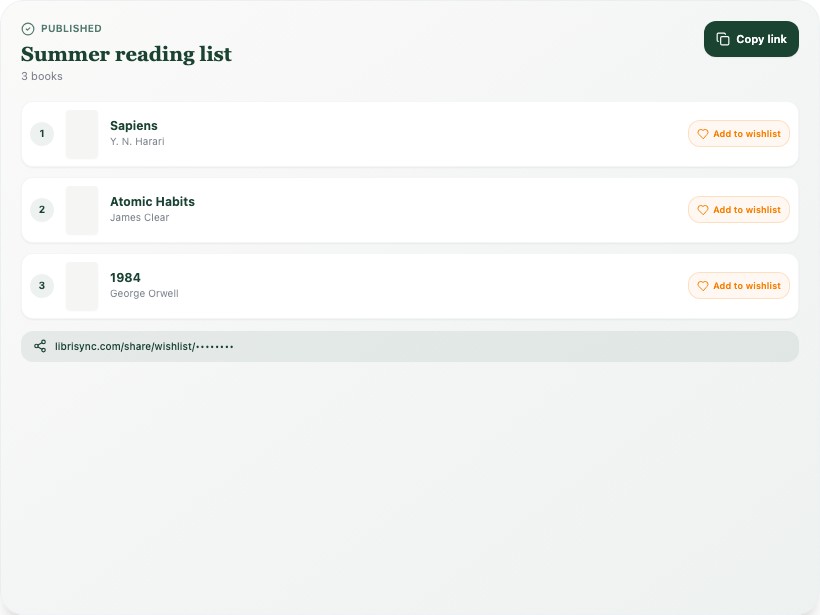
Published
Summer reading list
3 books
Copy link
1
Sapiens
Y. N. Harari
Add to wishlist
2
Atomic Habits
James Clear
Add to wishlist
3
1984
George Orwell
Add to wishlist
librisync.com/share/wishlist/••••••••
What you can do
Pick which wishlist books go into a shared list
Set their order and priorities, then add a short note
Share the list or selected shelves by link
Update the published list or revoke the link anytime
How it works in the app
The feature is connected to the rest of your library, so every scan, note, shelf, and reading update stays useful later.
- 1
Adding a book while you stand in the bookstore
You're in an airport bookstore holding a mass-market paperback of Lonesome Dove, and you can't remember whether you own it. Open Librisync and search your catalog first. It's readable offline, so a weak signal in the back aisle doesn't matter. Not in your catalog? Open the wishlist search and type the title, author or the ISBN printed on the back cover. Pick the right match from the results and add it. The paperback goes back on the shelf instead of to the register, and it now sits on your wishlist, ready for someone else to buy.
- 2
Building the list two weeks before your birthday
Your sister asks the family group what you want this year. Your private wishlist holds 40 books, half of them passing whims. Select the eight you'd actually love, move James by Percival Everett to the top and give it the highest priority. Add a line of context: a paperback is fine. Publish, copy the link and paste it into the chat. Your uncle only buys cookbooks? Share your Cookbooks to try shelf with him on its own. The rest of your library stays out of both links.
- 3
What happens after people open the link
Your friend Jo opened the link and liked two of your picks for herself. Signed in to Librisync, she added them to her own wishlist, and Librisync checked for an existing match before creating a new entry. On December 26, three books from your list are on your nightstand. Remove them and update the published list, so January visitors see only what's still open. Then you notice the link reached a cousin's partner you barely know. Revoke it. The old link stops showing your list, and your private wishlist stays as it was.
Private by default, useful when shared
Your library starts private. Share public shelves or curated wishlists only when you choose, keep personal notes to yourself, and use Librisync across devices without turning your reading life into a social feed.
- Private personal library
- Optional public sharing
- Works on phone and desktop
Connected to the whole library
Each feature works best with the others: scan books, organize them, track your reading, and come back to the right title whenever you need it.
Your library viewSee how the library view in Librisync works: custom shelves and tags, filters, search, book cards with notes, loan tracking, and a catalog readable offline.Reading trackerSee how reading tracking works in Librisync: log your pages, set a yearly book goal, check your stats. On the free plan.Bookshelf scannerPhotograph one shelf and get title, author, cover and ISBN for each visible book. Fix or drop matches, then import. Free for up to 100 books.View all Librisync features
Frequently asked questions
- Can people mark a book as bought so nobody doubles up?
- No. The shared list doesn't track who bought what, and nobody gets a notification. Settle it in your family chat, then take the book off your wishlist once it's been given and update the shared list.
- Does sharing my wishlist show my whole library?
- No. A shared wishlist shows only the books you selected for it, in the order and with the priorities you set. Shelves are shared one at a time, and a shelf you don't share never appears behind any link.
- Can readers add books to their own wishlist?
- Yes. Anyone signed in to Librisync can add individual titles from your shared list to their own wishlist. Before a new entry is created, Librisync checks whether a matching book is already there.
- Can I check my books in a store with no signal?
- Yes. Your catalog is readable offline and synced between phone and laptop, so you can search your collection in the store before buying. Searching for a missing book to add to your wishlist needs an internet connection, so you add it once you're back on Wi-Fi or have a signal.
Ready to organize your bookshelf?
Free forever plan. No credit card required.